Trading laboratory
Choose a futures market and see where an EMA strategy enters and exits a trade.
Futures scanner
Binance USDⓈ-M · BTCUSDT, ETHUSDT, SOLUSDT, BNBUSDT, XRPUSDT
Binance USDⓈ-M · UTC
| Market | Price, USDT | 24h, % |
|---|---|---|
| ETHUSDT | 1636 | -0.548 |
| BTCUSDT | 58966.1 | -0.317 |
| XRPUSDT | 0.9293 | -0.928 |
| BNBUSDT | 548.69 | -0.378 |
| SOLUSDT | 70.73 | 0.071 |
Rule editor
EMA 5 / 20 · EMA 12 / 20
A cross above EMA 20 opens a long. A cross below closes it. Order size is 250 USDT, stop 0.30%, target 0.45%, cooldown 3 bars.
Historical report
The engine replays 168 closed hourly Binance futures candles with indicator warm-up. Starting equity is 10,000 USDT at 1× leverage. The selected fee applies to each fill; market slippage is 1 basis point.
BTCUSDT · EMA 12 / 20 · UTC
- 7-day return
- -0.0099 %
- Trades
- 1
Build your first strategy
On Free, wire two EMAs to entry and exit rules in the Graph editor, backtest the result and launch that version on paper.
Build this strategyNews
- Backtests now trade inside every bar on the exchange's finer candles
- Backtest audit, part 4: checking the backtest itself
- Backtest audit, part 3: how the results are shown
API · AI tools
Give your assistant the strategy format pack to compose a graph. The API reference explains how to validate it, submit a backtest and read its result.
Strategy format pack
metrand-strategy-format.md
A Markdown text file containing the Metrand graph format, supported blocks and examples.
- Attach the file to an AI chat and describe the market, entry and exit rules, and risk per trade.
- In your workspace, open Strategies → New strategy → Import a file. Paste the JSON and run a backtest.
Trading tools
Manual trading
Found a coin worth watching? Open it in the terminal, choose your exchange account and trade without building a strategy.
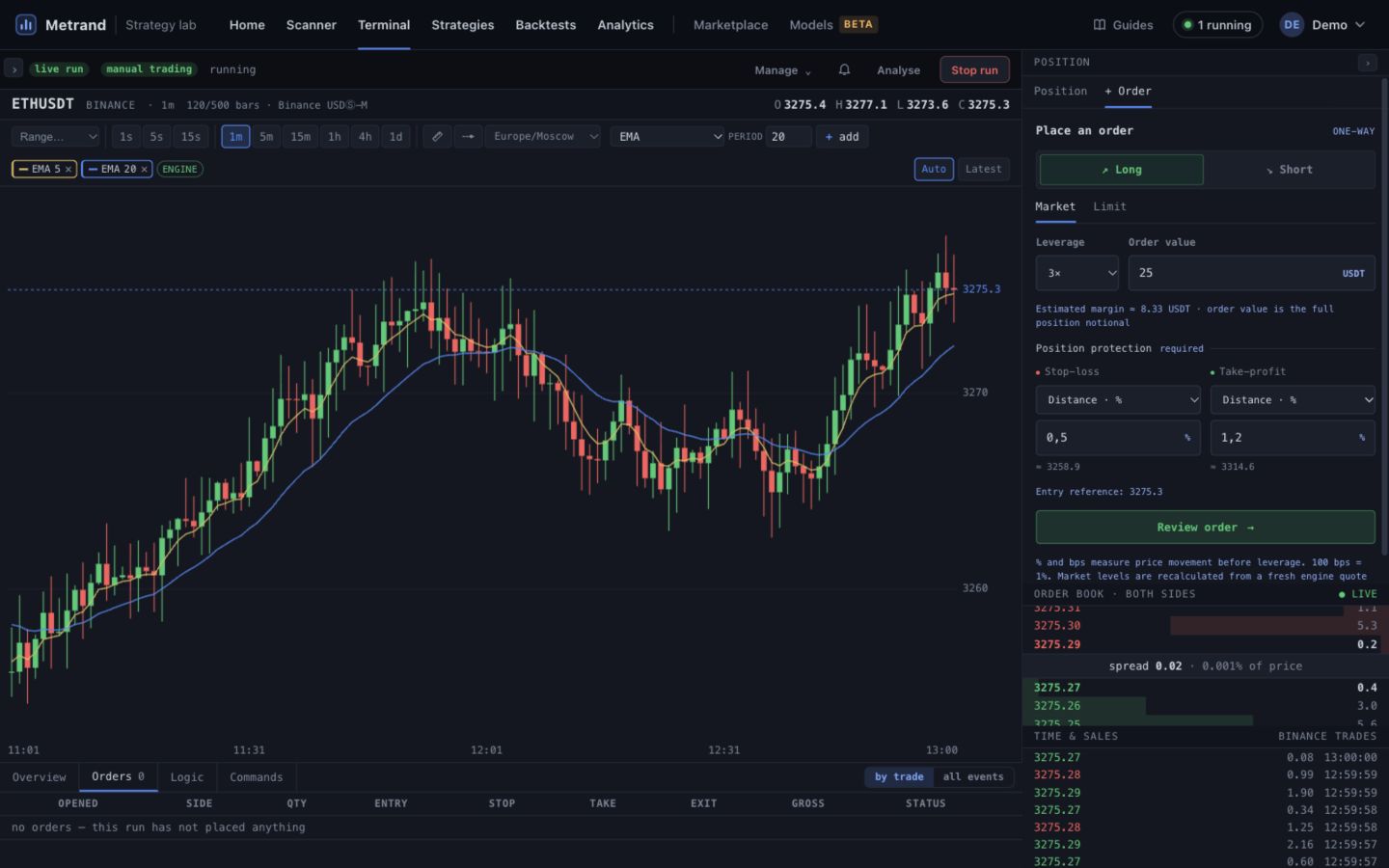
Open the terminal How to start
The scanner is free. Exchange trading requires Pro or Expert and your own API keys without withdrawal permissions.
Live trading is currently disabled on this deployment. The scanner, backtests and paper trading remain available.
Visual strategies
Build a strategy from blocks, from market data and entry conditions to exits and risk management. Start with a simple template, then open the full graph when you need more control.
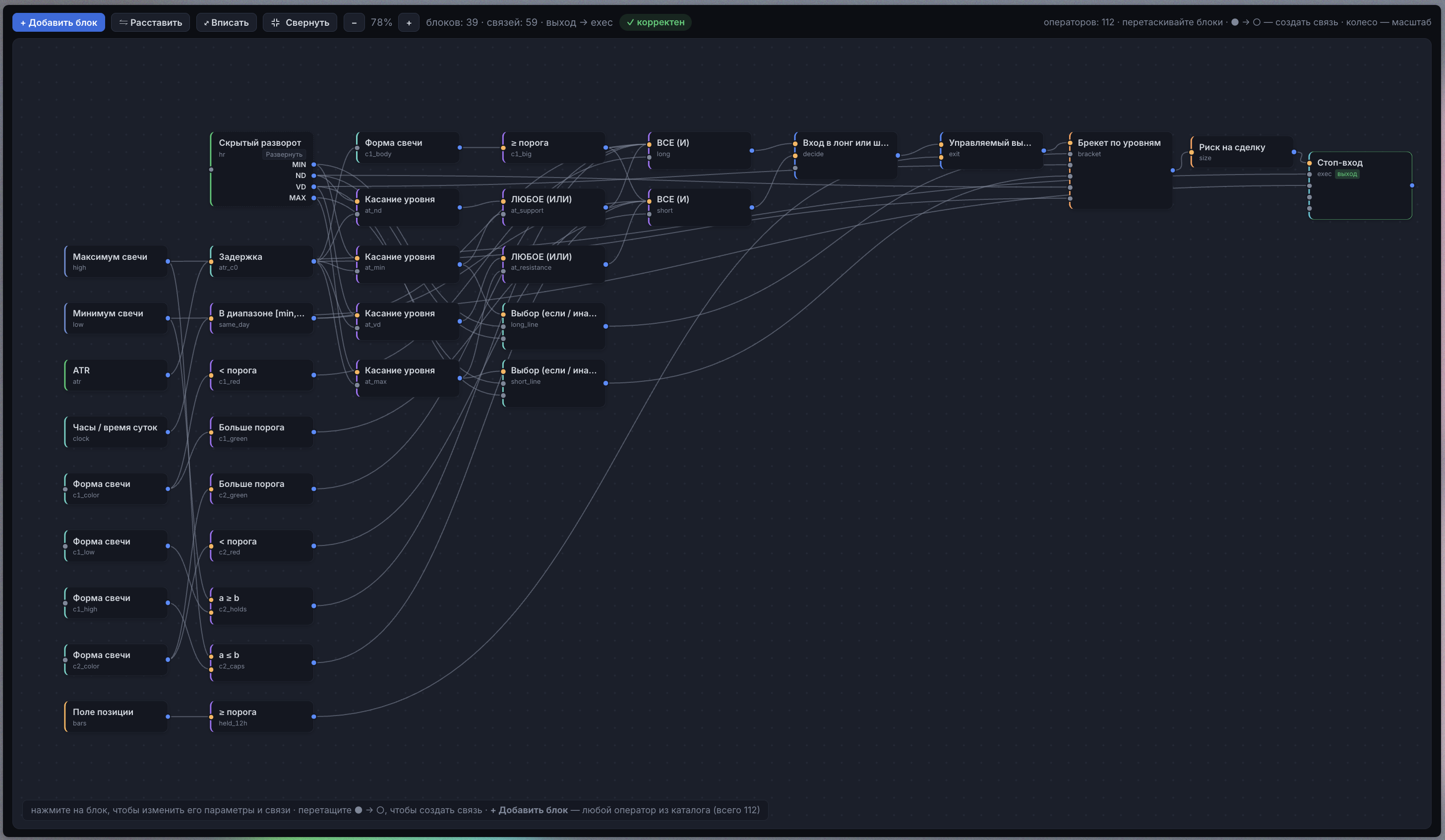
Open EMA template How strategy graphs work
Templates, the Builder and the full graph editor are available on Free.
Pricing
Free while you explore.
Upgrade when you need more research capacity.
Available payment methods are shown when you choose a plan.
Every plan runs the same engine and the same backtests.
Questions
Before you sign up.
Is Metrand a signal service or a bot that makes money for me?
No. It is a lab for testing your own ideas, or templates and AI-written strategies, against real history with real costs. It does not tell you what to trade and does not promise returns.
Do you hold my funds?
No. Live runs place orders on your own exchange account through an API key you create, and keys that can withdraw are refused. Backtests and paper trading need no key at all.
Which exchanges and markets?
The scanner, backtests and paper trading cover Binance USDⓈ-M and Bybit USDT perpetual futures. To place exchange orders, connect your own futures account on a supported exchange.
Can I trade from my country?
Before connecting an account, check futures availability in your country and your exchange’s terms. Access to Metrand does not override Binance or Bybit restrictions. Backtests and paper trading need no exchange account.
Will a good backtest repeat live?
There is no guarantee, and results on new data are usually weaker than on the history a strategy was tuned on. The tests across periods, the out-of-sample check and our public journal are there to show how much weaker.
Can ChatGPT write me a profitable strategy?
It can write one in Metrand’s format with the AI pack. Whether it holds up is what the backtest is for, and most ideas do not survive costs.
How do payments work?
Paid plans are paid in USDT for a month or a year. Choose an available network when you create the invoice. Nothing renews by itself: you are reminded a few days before the end, and the Free plan has no time limit.
How do I delete my account?
Account → Profile & security → Delete account. Your exchange keys and personal details are deleted at once; payment records are kept as accounting requires.
Can I register without an invitation?
Yes. Create a free account with no invitation or bank card. The scanner, backtests and paper trading are available on Free.
How do I start live trading?
Live trading is currently disabled on this deployment. The scanner, backtests and paper trading remain available; your account shows the access status.
Can I trade manually without a strategy?
Yes. Choose “+ Manual trading” in the terminal or open it from a coin card in the scanner. Select an exchange account and place a market or limit order with a stop-loss and take-profit. Exchange trading requires Pro or Expert and a verified API key.